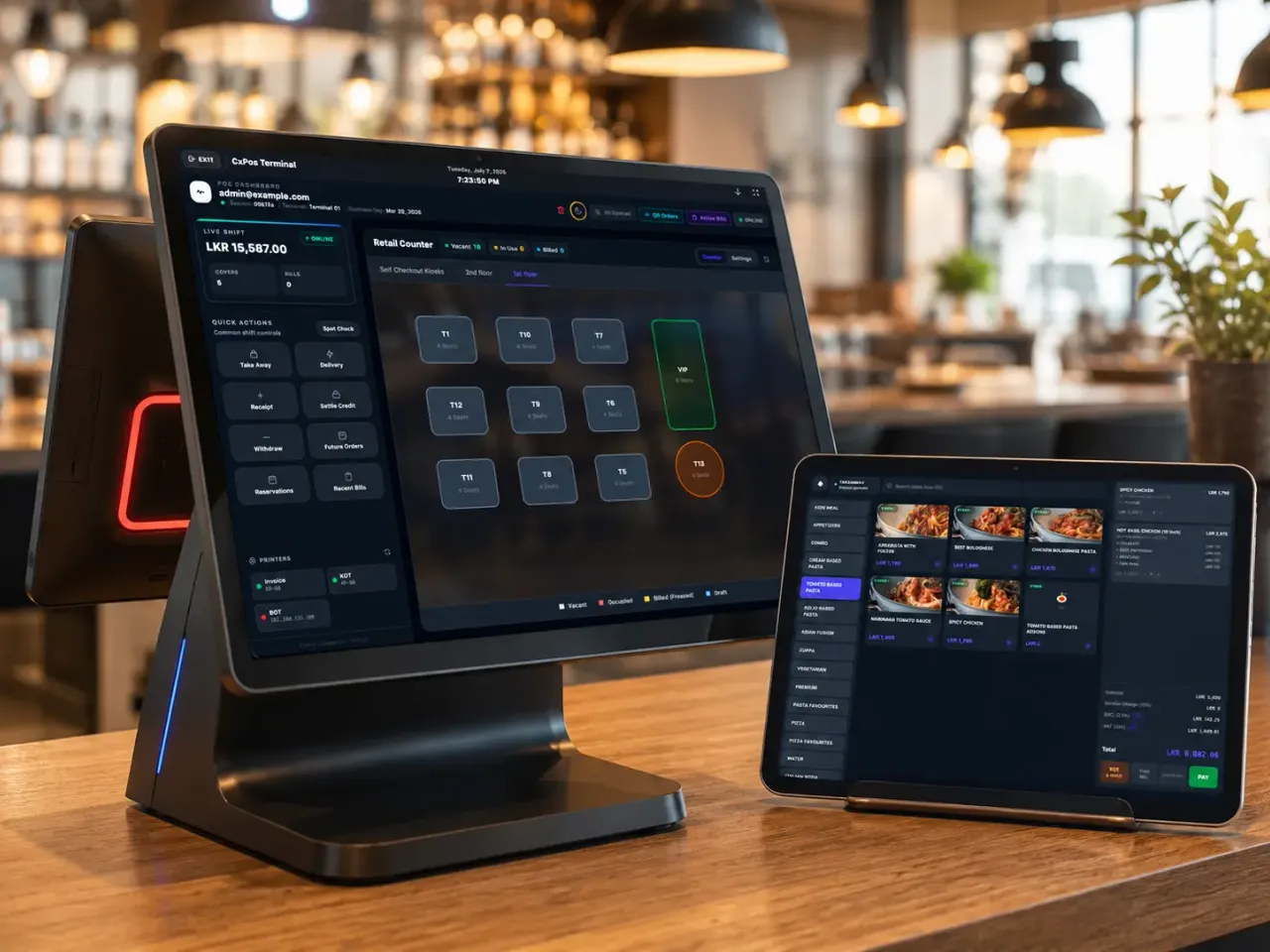
Custom Multi-Floor Tables & Flexible Bills
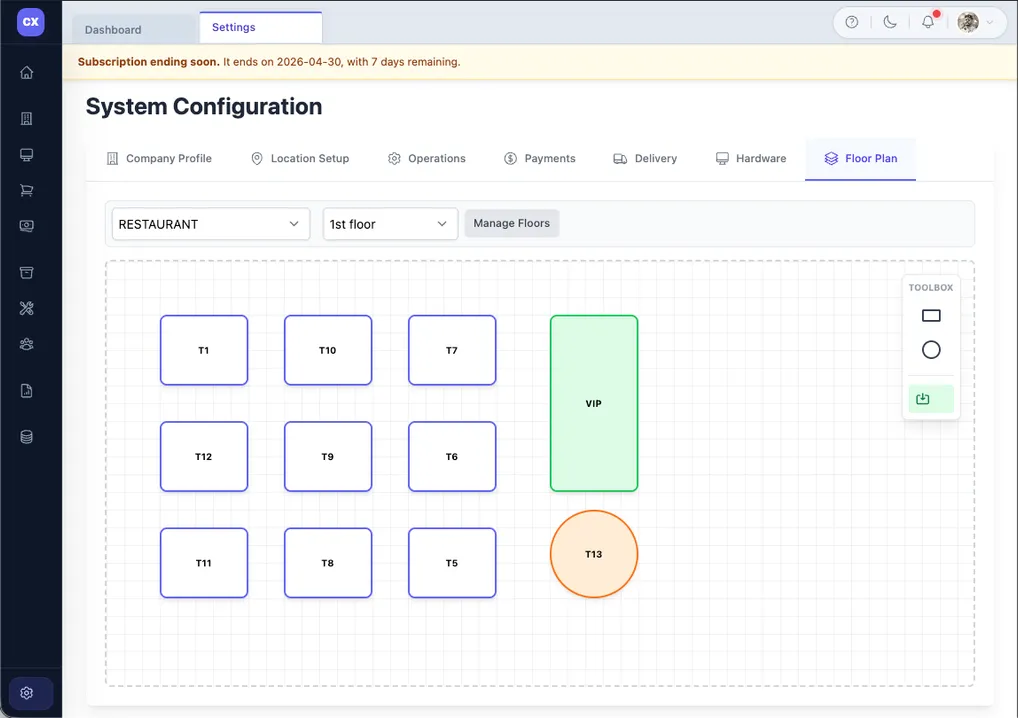
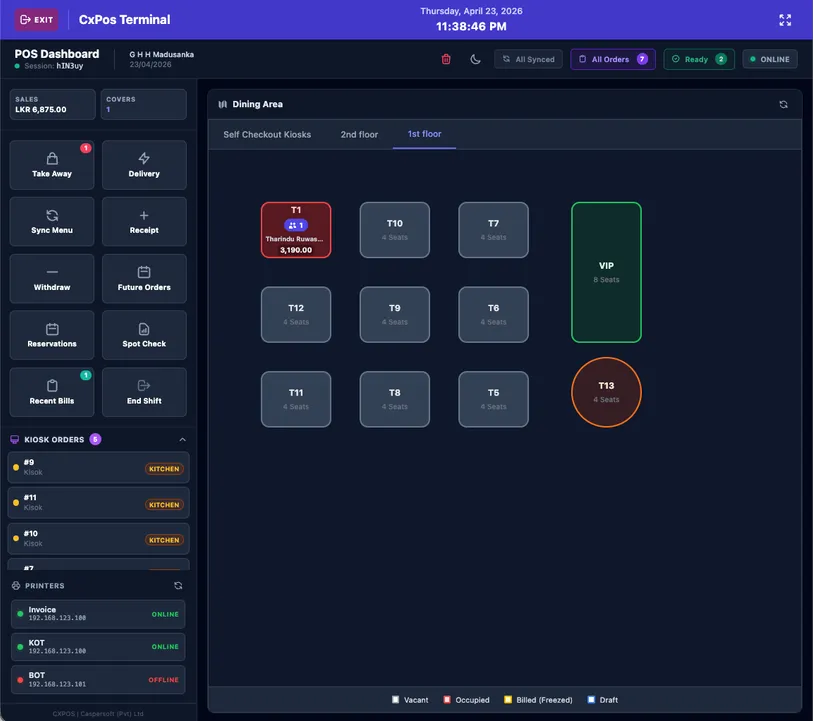
- Customize table shapes, sizes & colors with drag-and-drop layouts
- Maintain multiple floors, outdoor decks, rooftop bars & VIP rooms
- Built-in Table Merge, Table Split, Table Move & Payment Split
Orders, kitchen, billing, and inventory — connected in one simple system. Built for Sri Lankan hospitality, from the first order to the final bill.

Every Type of Food Business
Whether you run a single cafe in Kandy or a chain of hotel restaurants across the island — CXPOS has the tools, integrations, and smart features to match your operation.
Tables, split bills, steward orders, KOT, and cashier operations for busy full-service restaurants.
Fast counter billing, takeaway, loyalty, and quick-service workflows for cafes, bakeries, and coffee shops.
Peg-wise stock, bar inventory, wastage, and bartender tabs with cost control and visibility.
QR ordering, kitchen routing, and Custom package delivery integrations inside one connected restaurant billing system.
From camera-assisted bar stock to sales forecasting and upselling suggestions — intelligent features are built into CXPOS so your operation runs smoother without extra tools or subscriptions.
Point a camera at your bar shelf. CXPOS reads bottle levels, counts stock, and logs it — no manual counting sheets required.
CXPOS analyses your order history and surfaces busy periods, top-selling items, and revenue trends — so you can plan staffing and stock ahead.
The system suggests pairings and add-ons to staff on the POS screen and to guests on the QR menu — automatically, without any manual setup.
CXPOS monitors usage patterns and warns you before you run out — not after. Plan your supplier orders with no last-minute surprises.
CXPOS identifies slow periods in your sales data and suggests the right time to run happy hour, combo deals, or seasonal discounts.
See exactly which menu items are eroding your margin and where to adjust pricing or portion sizes — presented clearly in the back office.
Core restaurant workflows stay in standard packages, while hardware-heavy checkout, delivery APIs, and enterprise integrations sit in Custom so the quote is clear from day one.
Ridiculously Easy to Use
Modifiers. Promotions. QR ordering. Kitchen routing. Customer checkout. Delivery integrations. CXPOS keeps everyday workflows simple and reserves advanced hardware or API work for Custom.
Let staff or guests choose size, add extras, remove ingredients, or pick a cooking style — all in a few taps. Modifier groups are priced individually and apply automatically.
Happy hour, combo deals, BOGO, loyalty rewards, time-based discounts, and seasonal offers — fully configurable from the back office in minutes.
CXPOS connects directly to certified Electronic Cash Register (ECR) devices for tax-compliant fiscal receipt printing — required for certain business types and regulatory environments.
Guests scan a QR code at the table, browse a visual menu with photos, customise using modifiers, and send orders directly to the kitchen — without waiting for a waiter.
In the Custom package, guests view their bill, split it with the table, and pay directly from their phone or a kiosk — card, cash, or digital wallet. No queue at the cashier.
On the Custom package, Uber Eats and PickMe Food orders land directly on your POS screen and auto-print to the kitchen. No second tablet. No retyping. One screen for everything.
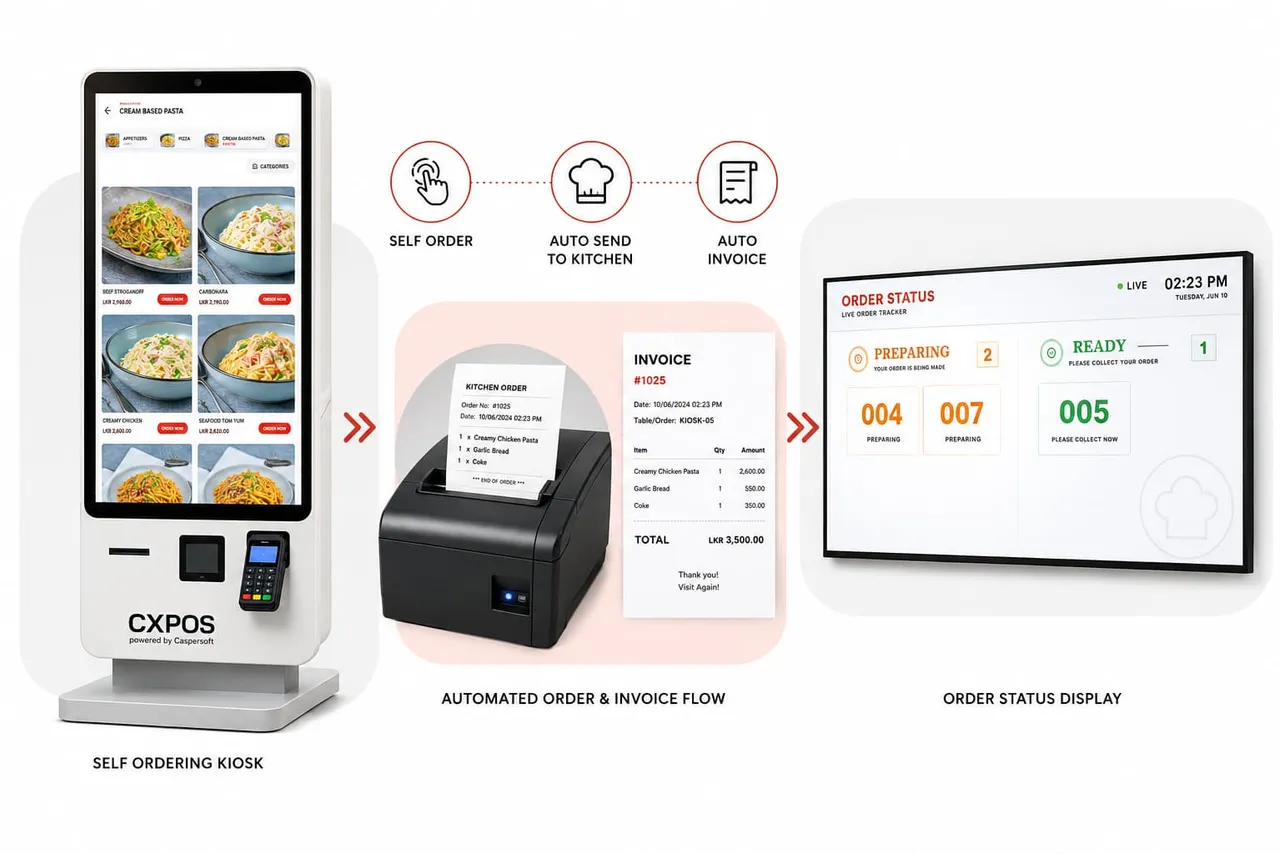
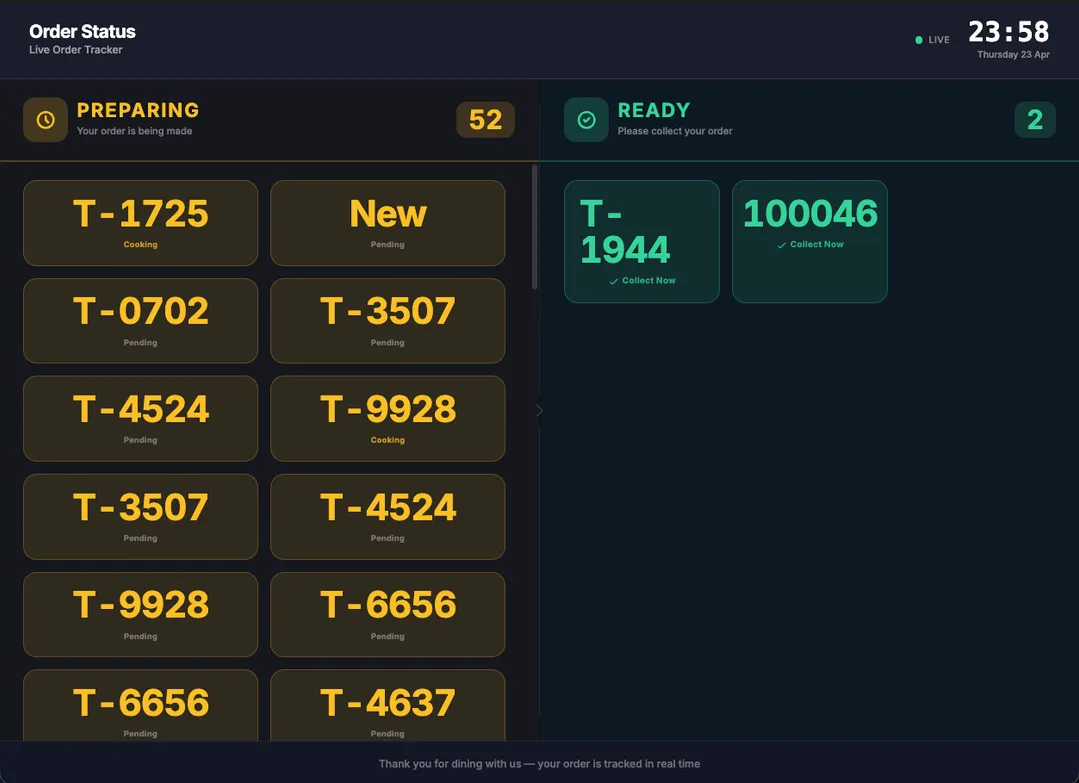
Guests order from a touch-screen menu, CXPOS sends the order to the kitchen, prints the invoice, and shows live order status on the customer display.

Guests browse the menu, choose items, add modifiers, and place the order from the kiosk.

Orders can move to kitchen printing and invoice printing automatically after checkout.

Customers see preparing and ready order numbers clearly on a customer-facing display.
THE REAL ORDER JOURNEY · NARRATED WALKTHROUGH
Watch our step-by-step English video guide to see how Dine-In multi-floor plans, table merge & split, Steward table locking, Table QR ordering, Self-Ordering Kiosks with KDS & Queue TV, and Counter Takeaway work together in real life.
0:00 · Connected Flow: Every restaurant order follows its own path. With CXPOS, dine-in tables, steward tablets, table QR codes, self-ordering kiosks, and counter takeaway all work together inside one simple, connected system.
0:14 · Custom Floor Plans: For dine-in service, open any table right from your visual floor plan. You can customize table shapes, sizes, and layouts to match your restaurant, and easily manage multiple floors, rooftops, or VIP dining areas.
0:31 · Merge, Move & Split: When guests change plans, CXPOS adapts in seconds. Merge tables for big groups, split one table into separate bills, move guests to another table, or split payments by item or guest at checkout.
0:45 · Steward Tab & Lock: On the floor, a steward can lock an active table so two devices never clash on the same bill. Using the Steward Tab, staff take orders right at the table, send instant kitchen tickets, and finalize bills smoothly.
1:00 · QR Self-Ordering: With QR self-ordering, guests simply scan the QR code on their table, browse the digital menu, and place their order. CXPOS automatically links that order to the right table and prints the KOT in the kitchen. Guests can pay right from their phone, or choose Pay at the Counter.
1:17 · Self-Ordering Kiosk: At a self-ordering kiosk, the customer selects items and completes payment on screen. The order goes straight to the Kitchen Display System. Once the chef marks it ready on the KDS, the Customer Queue Display updates the status, notifies the guest, and they collect their meal.
1:32 · Counter Takeaway: And for everyday takeaway, the cashier punches the order in seconds, charges right away or holds the bill while food cooks, prints the kitchen ticket, and hands over the packed order by token number. Every order journey, connected in CXPOS.
System UI Preview
Explore the CXPOS interface and self ordering experience.

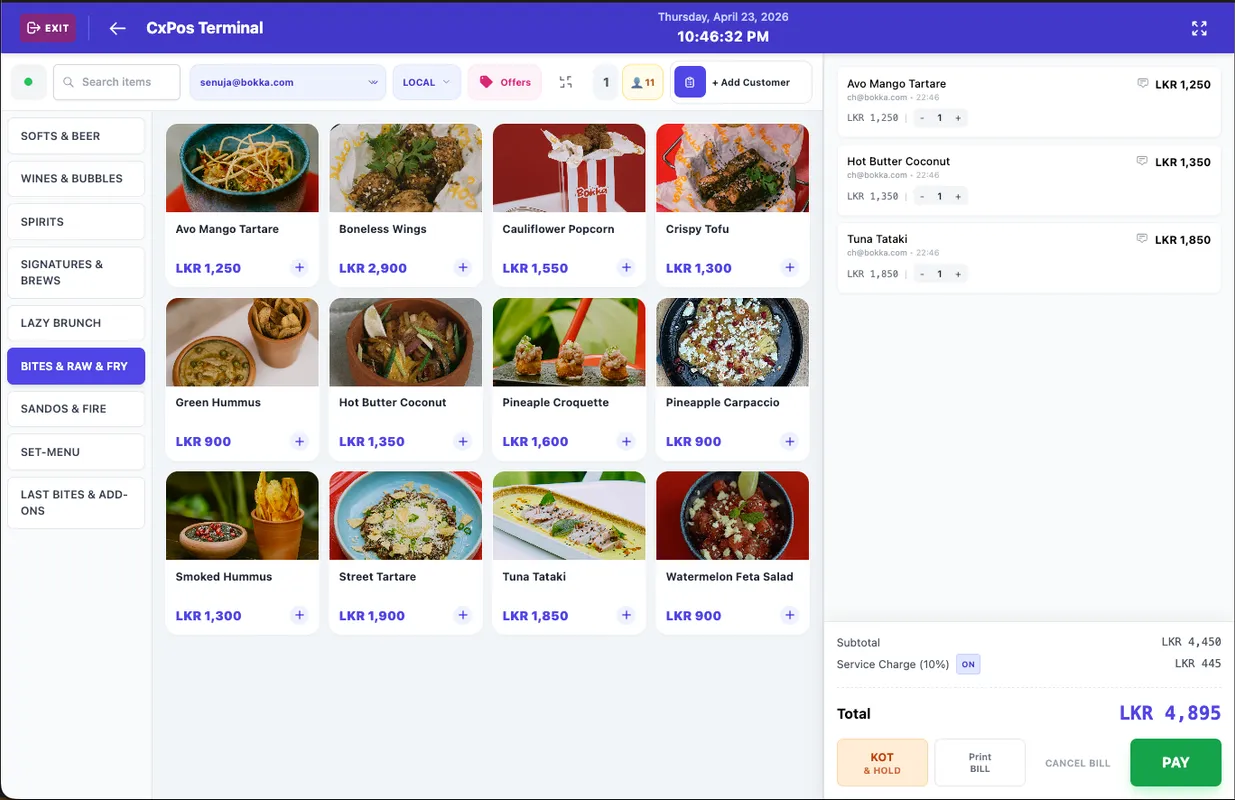
Main POS billing interface — add items, apply modifiers, and settle with cash, card, or digital wallet in seconds.

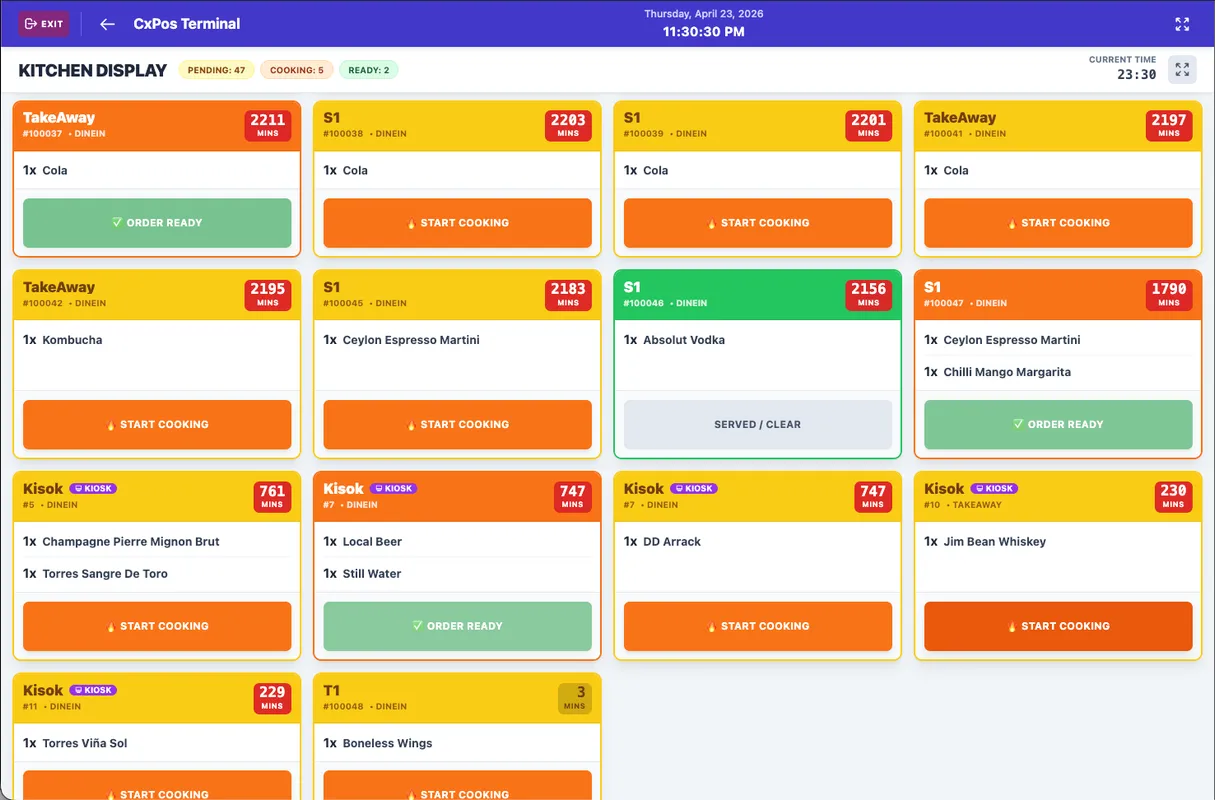
Kitchen screen showing incoming orders with modifiers, prep times, and special instructions — so the kitchen can start cooking immediately without waiting for printed tickets.

Customers can see their order status in real time on a customer-facing display — from order received to in preparation to ready for pickup.

You can fully customize your table floor plan by changing table names, positions, colors, shapes, and sizes with simple drag-and-drop controls. You can also manage multiple floors and multiple decks.

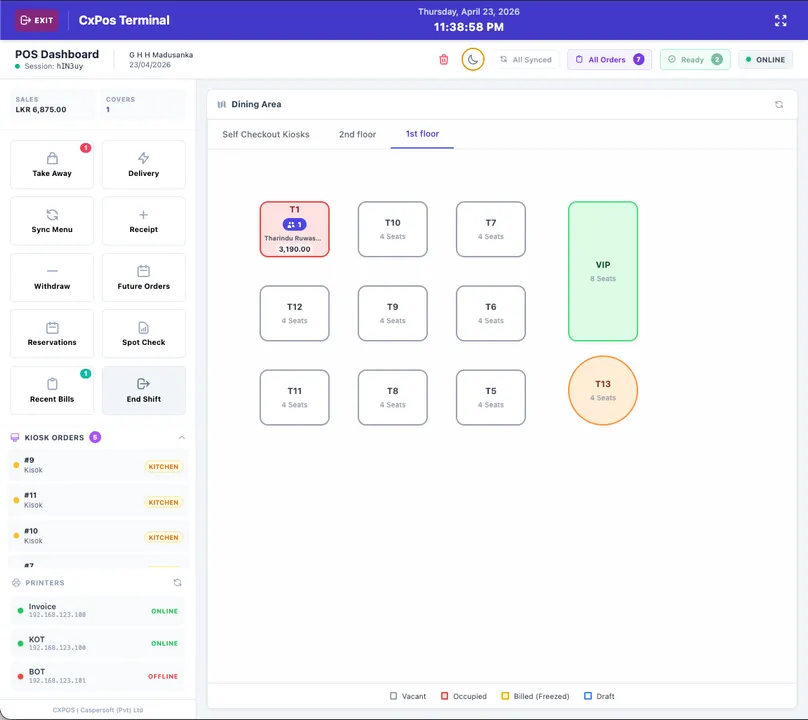
Visual floor-plan view showing which tables are occupied, waiting, or available. Merge and transfer orders easily.

Visual floor-plan view showing which tables are occupied, waiting, or available. Merge and transfer orders easily.

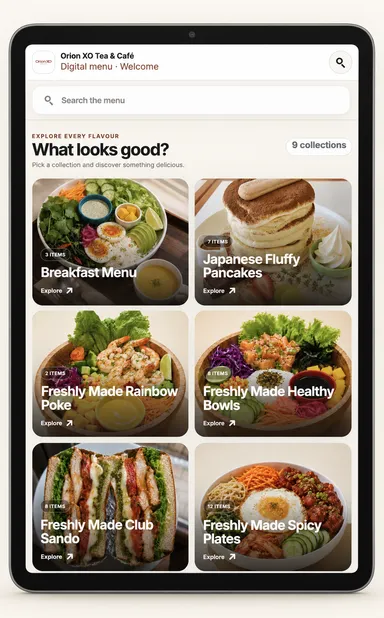
Guests explore food collections and find a dish through a visual digital menu.

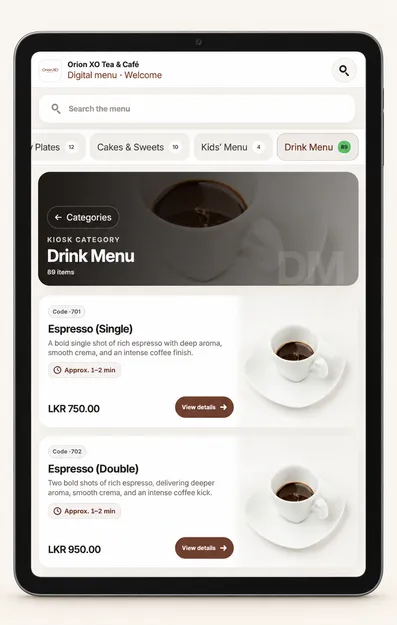
Guests browse drink categories, view item details, and see prices before ordering.

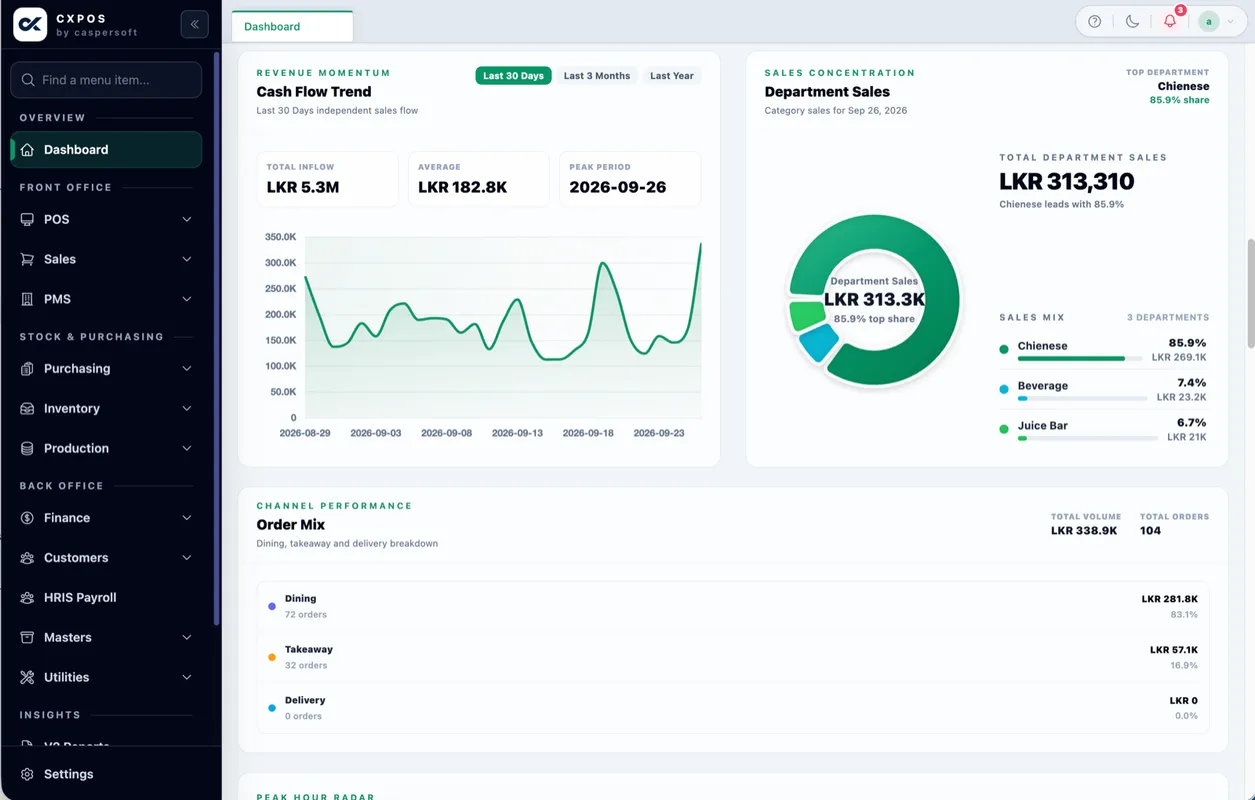
See cash flow trends, department sales, and order mix in one clear overview.
Flexible Packages
Compare the software packages, then confirm equipment, installation, training and support in your written quote.
Launch fast, keep it simple
Everything a single-outlet cafe, takeaway, or small restaurant needs to start billing professionally from day one.
Add kitchen and QR flow
A stronger operating package for restaurants that need kitchen visibility, QR ordering, and tighter stock control without custom integrations.
The complete restaurant system
Full-featured POS for restaurants, bars, and cafes that need promotions, tableside ordering, loyalty, and deeper reporting in one system.
Built for scale and complexity
Contact us for pricing
Tailored package for multi-outlet chains, hotel groups, kiosk/self-checkout rollouts, and delivery-heavy brands with API, hardware or AI Agent setup requirements.
All prices are in LKR per month. Hardware and setup costs may vary. On-site installation, training, travel and accommodation are quoted separately. Chat with us on WhatsApp for a tailored quote.
Understand software, hardware and setup costs →Customer stories
From restaurant groups and live-music venues to campus cafeterias and coastal hospitality. Meet some of the businesses we work with.

Caspersoft works with Double Barrel, bringing its restaurant software experience to a Sri Lankan BYOB dining business.
Meet Double BarrelRestaurant network
Caspersoft works with Business Process Management, known as BPM, a customer operating a restaurant network across Sri Lanka.
Read customer context →Dining, live music & events
Caspersoft works with Vin’s by Veritas, the Kandana venue combining dining, BYOB hospitality, live music and sports.
Read customer context →Food business
Delmo is part of Caspersoft’s customer base, extending our business-software experience beyond restaurant dining rooms.
Read customer context →Campus food service
Caspersoft provides cafeteria systems for CINEC Campus, bringing its food-service software into an education setting.
Read customer context →Ahangama · Hiriketiya · Weligama
Local software and implementation for internationally owned coastal hospitality businesses serving an international guest market.
Read customer context →Mall restaurant operations
Explore the published story about connected ordering, kitchen workflows and mall-system integrations.
Read the deployment story →Practical guides
Pricing guide 5 min read
Compare CXPOS subscriptions and understand the hardware, installation, training and integration questions that shape your restaurant POS budget.
Read the guideImplementation guide 5 min read
Prepare your menu, hardware, kitchen routes, staff permissions and service tests before installing or replacing a restaurant POS system.
Read the guideOperations guide 6 min read
A practical business process management guide for restaurant owners: connect orders, kitchens, stock, approvals and reporting across different service models.
Read the guideWhy Caspersoft
Local team. Local understanding. Built for Sri Lankan food businesses. We're with you from install day to every service rush.
We adapt CXPOS to your specific workflow — dine-in, bar, hotel, or cloud kitchen.
Common features and security updates are always free. Your system grows as we do.
Our team handles everything A to Z — installation, training, and daily operation queries.
Got questions?
Everything you need to know before choosing CXPOS for your restaurant in Sri Lanka.
Still have questions about CXPOS?
Tell us about your restaurant and we'll recommend the right package — no pressure.
Join 300+ restaurants, cafes, bars, and hotels across Sri Lanka using CXPOS. Get a free personalised demo — no setup fee, no commitment.
Free training · Works offline · Local support team · 4 flexible packages